Print History and Statistics
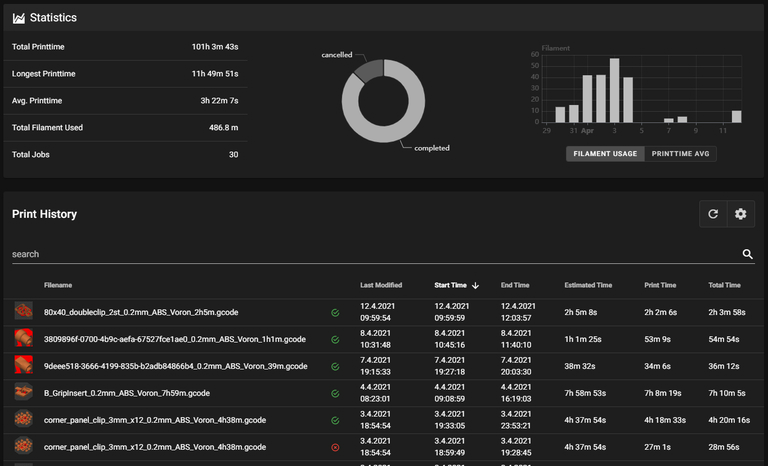
Moonraker tracks your print jobs and stores detailed information about each print. Mainsail provides a user interface to view this data, including job history, statistics, and charts on the History page.
Enable Print History
The history feature is provided by Moonraker. Add the following section to your moonraker.conf:
Once enabled, the History page will appear in Mainsail's sidebar.
For more configuration options, see the Moonraker history documentation.
Statistics
The statistics panel displays aggregated data across all your print jobs:
- Total Print Time: Combined duration of all prints
- Longest Print Time: Duration of the longest print job
- Average Print Time: Average duration per print
- Total Filament Used: Combined filament consumption
- Total Jobs: Number of tracked print jobs
Additionally, Mainsail displays:
- Job Status Chart: Visual breakdown of completed, cancelled, and failed prints
- Filament Usage Chart: Filament consumption over recent jobs
- Print Time Chart: Average print time trends
Custom Statistics
You can generate statistics from selected jobs by marking specific entries in the job list below the statistics panel.
Job List
The job list shows all tracked print jobs with the following information:
- Status: Completed, cancelled, or failed
- Filename: Name of the printed G-code file
- Duration: Total print time
- Filament Used: Amount of filament consumed
- Start/End Time: When the print started and finished
Filtering and Searching
You can filter the job list by:
- Status: Show only completed, cancelled, or failed jobs
- Search: Find jobs by filename