WebRTC
To use WebRTC, replace ?action=stream with webrtc in your webcam URL configuration.
Note
This feature only works if you are using mode: camera-streamer or mode: spyglass on a Raspberry Pi.
Raspberry Pi 5 users
The Pi 5 has no hardware video encoders, which causes several limitations:
mode: camera-streameris not supported. Crowsnest ships the Raspberry Pi-specific build of camera-streamer, which relies on hardware encoding and therefore does not run on the Pi 5.- WebRTC is disabled by default in Spyglass on the Pi 5, because software encoding
consumes a significant amount of CPU resources. If you still want to enable it, set
mode: spyglassand addcustom_flags: --force-webrtc, but we do not recommend it.
Warning
Do not change the URL Snapshot setting! It should remain the same as before.
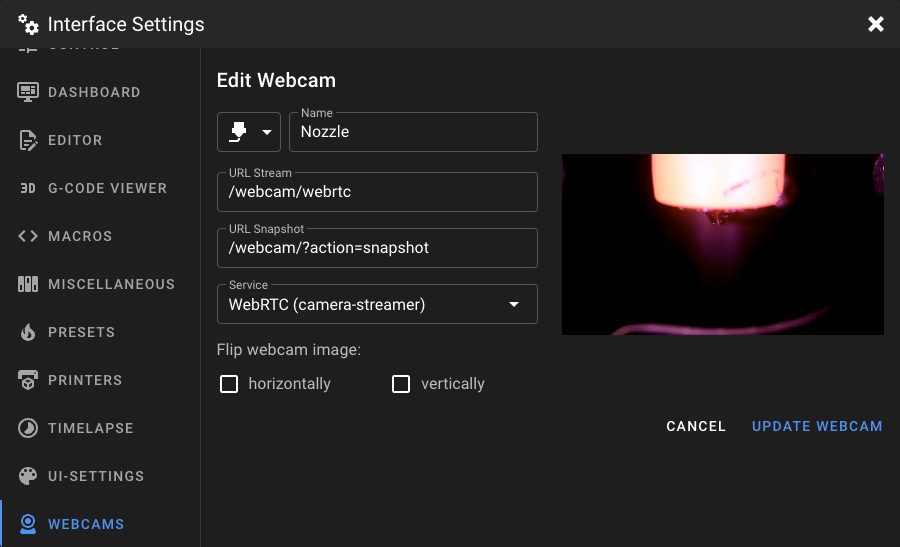
Which service should I choose?
Mainsail offers multiple WebRTC services. The correct choice depends on the mode you have set for the camera
in your crowsnest.conf:
Mode in crowsnest.conf |
WebRTC Service in Mainsail |
|---|---|
camera-streamer |
WebRTC (camera-streamer) |
spyglass |
WebRTC (MediaMTX) |