Deprecated MCU Code
Klipper consists of two parts: the host software running on your Raspberry Pi (or any other host) and the firmware running on your MCUs (mainboard, toolhead board, display, Linux MCU, etc.). Both parts are updated together, but the MCU firmware has to be compiled and flashed manually after a Klipper update.
If the host software has been updated but an MCU is still running an older firmware, Klipper shows this warning:
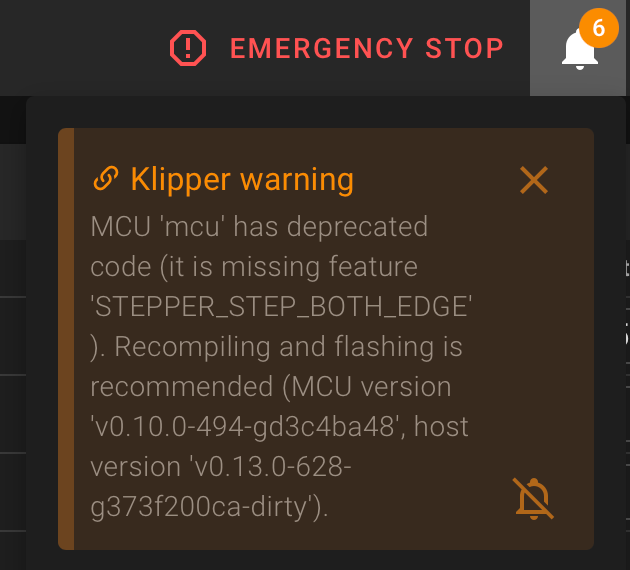
Description of the warning message
The message always follows the same pattern:
MCU '<mcu name>' has deprecated code (it is missing feature '<feature name>'). Recompiling and flashing is
recommended (MCU version '<mcu version>', host version '<host version>').
<mcu name>is the name of the MCU as configured in yourprinter.cfg. In the screenshot above it ismcu, which is the primary mainboard. Other common names areEBBCan(a CAN toolhead board),displayorrpi(a Linux MCU, mostly used for an accelerometer connected to the GPIO of the host).<feature name>is the internal name of a firmware feature the host software wants to use, but which is not available in the currently flashed firmware. Examples areSTEPPER_STEP_BOTH_EDGEorspi_set_sw_bus. You do not have to know what these features do, the fix is always the same.<mcu version>and<host version>show the currently flashed firmware version and the version of the Klipper host software. If both differ, the MCU firmware is outdated.
Info
This message is only a warning, not an error. Your printer keeps working, but Klipper has to fall back to an older and often less efficient implementation. Depending on the missing feature this can, for example, limit the maximum step rate of your steppers.
How to fix it
Recompile the firmware for the MCU mentioned in the warning and flash it onto the board. The procedure is exactly the same as described on the MCU Protocol error page:
- Compile a new firmware with the settings for your board.
- Flash the firmware onto the board.
Repeat this for every MCU listed in a warning. Afterward, restart Klipper. If all MCUs run the same version as the host, the warning disappears.
Warning
Make sure to use the firmware settings of the correct board. Every MCU (mainboard, toolhead board, display, ...) needs its own firmware. Flashing a firmware built for a different board can leave the board unusable until it is reflashed via its bootloader.
Need help?
If you have problems compiling or flashing your board, or cannot find the firmware settings for your board, please get in touch with your Klipper/Printer Discord/Forum or visit our Getting Help page for all Mainsail community channels.