Deprecated Options
Klipper occasionally deprecates configuration options as the firmware evolves. When this happens, Klipper will display
a warning message during startup, indicating that your printer.cfg contains outdated options that need to be updated.
Below you can find a list of commonly encountered deprecated options along with step-by-step instructions on how to fix them. For a complete list of all configuration changes, refer to the official Klipper Configuration Changes documentation.
Removal of relative_reference_index
The relative_reference_index option has been deprecated and superseded by the zero_reference_position option.
Refer to the
Bed Mesh Documentation
for details on how to update the configuration. With this deprecation the RELATIVE_REFERENCE_INDEX is no longer
available as a parameter for the BED_MESH_CALIBRATE G-Code command.
Removal of default_parameter_ for G-Code macros.
In the past, default parameters for G-Code macros were defined like so:
This would define a macro called PRINT_START that can be called with an EXTRUDER parameter like so:
PRINT_START EXTRUDER=200. If no value is passed for EXTRUDER the default value of 230 is used. This style of
default parameters has been deprecated. Instead, define your macro like so:
Take note of the following important aspects:
-
Parameters passed to G-Code macros are stored in the
paramsobject. So if your macro is called withVALUE=50,params.VALUEwill contain the value 50. After the deprecation, only theparamsobject will contain these values. -
Make sure to name your "set variable" something else as the name of the variable in the
paramsobject (see how I usedEXTRUDER_TEMPfor the "set variable" andEXTRUDERfor the actual macro parameter above) to avoid confusion and possible parsing errors. -
If you want to pass a default, add
|default(<default value>)to the end of theparamsvariable (see above, where my default value is 10). -
To ensure that
EXTRUDER_TEMPwill have an integer value, add|intto the end of the command, to turn passed parameters (if they exist) and the default into an integer. Depending on what kind of parameter you're passing, there are|int|float|boolor|stringconverters available. Make sure that you convert to int if you want to compare the values in your G-Code macro.
Information
The above description was provided by our community member FHeilmann and we have his permission to publish it here. Thanks a lot! Source
Removal of step_distance
step_distance describes the distance covered by a certain axis with 1 stepper (micro-)step. The downside of this
parameter (and one of the reasons for its removal) is that if one were to change the microstepping of a stepper, the
step_distance changes as well. Klipper therefore removed the step_distance parameter in favor of
rotation_distance and full_steps_per_rotation. These two parameters are unaffected by microstepping, and can be
easily determined by inspecting the used hardware.
Perform the following steps to convert your config:
-
comment out the old
step_distanceparameter -
add three new parameters:
-
full_steps_per_rotationthis is 400 for 0.9 degree stepper motors and 200 for 1.8 degree stepper motors. -
rotation_distancethis can be determined either according to hardware, or by converting the oldstep_distanceusing math. -
gear_ratiocan additionally be used to describe an axis that uses a reduction gear (like the Voron-2 Z axis) -
The easiest way to obtain the correct values for
rotation_distanceandgear_ratiois to check the official Voron printer Github repositories. All example configs have been updated to include the correct values for the new parameters. Keep in mind that you'll still have to calibrate your extruder steps/mm if you choose to copy the values for the extruder. Instructions on how to convert and recalibrate the extruder values can be found here. -
The formulas to convert
step_distancetorotation distancecan be found here -
Guidance on how to inspect your hardware to determine your conversion distance can be found here. Make sure to also consider any reduction gearing, if applicable, by checking this section as well.
-
For every stepper, except your extruder, you should end up with even numbers (e.g. 40 instead of 39.9683).
-
Information
The above description was provided by our community member FHeilmann and we have his permission to publish it here. Thanks a lot! Source
Removal of pin_map
For Voron printers, this is only relevant if you're running an Arduino based controller board and use pins named
similar to ar19 etc. These pin declarations are no longer valid and need to be replaced with their hardware pin
identifiers. To find the appropriate hardware pin identifier perform a google image search for your board plus
pinout. E.g.:
arduino mega 2560 pinout
which will yield images such as this one:
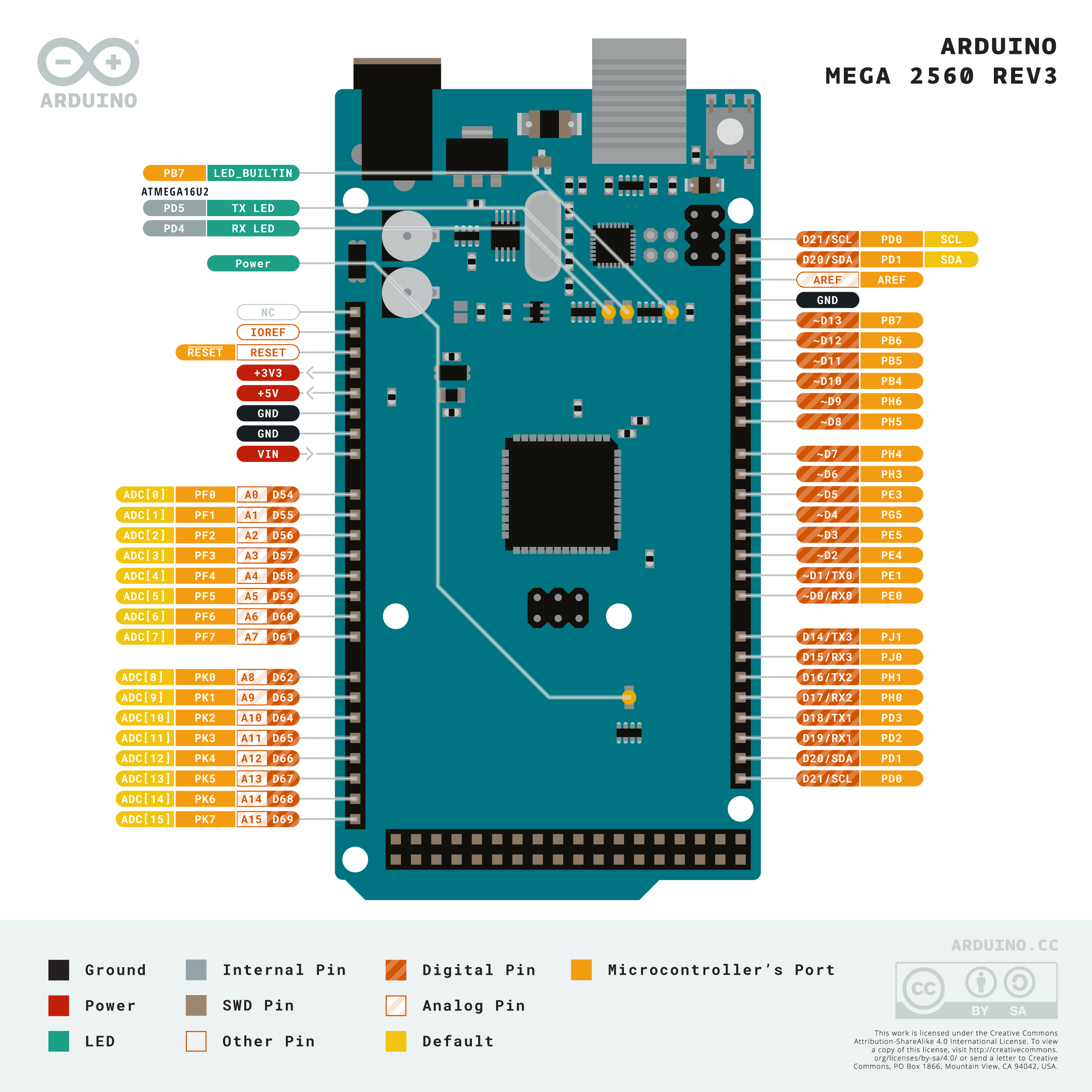
There, find the pin you're trying to replace. The old pin maps use the digital number of the pin. For example, if
your old pin was ar10, looking at the image you will find that the D10 pin corresponds to PB4. Replace all pins
in your config accordingly, and finally remove the pin_map: configuration parameter from your mcu section.
Alternatively, you can copy an appropriate [board_pins] block from
this location to
your config. If you're using multiple Arduinos, make sure to add the appropriate mcu to each block like so:
Information
The above description was provided by our community member FHeilmann and we have his permission to publish it here. Thanks a lot! Source
Removal of max_accel_to_decel
The max_accel_to_decel option has been deprecated and superseded by the minimum_cruise_ratio option. Refer to the
printer section documentation for
details on how to update the configuration. The max_accel_to_decel can be deleted in most cases, as the default
value of minimum_cruise_ratio should fit for most of the printers.