Orange Pi Zero 2
You can use the Orange Pi Zero 2, a compact SBC based on the Allwinner H616 SoC. Your board provides a 26-pin GPIO header and is supported by MainsailOS through an Armbian-based image.
Board Overview
| Property | Value |
|---|---|
| SoC | Allwinner H616 |
| RAM | 1 GB / 1.5 GB |
| Base Image | Armbian CLI |
| GPIO Header | 26-pin |
GPIO Pinout
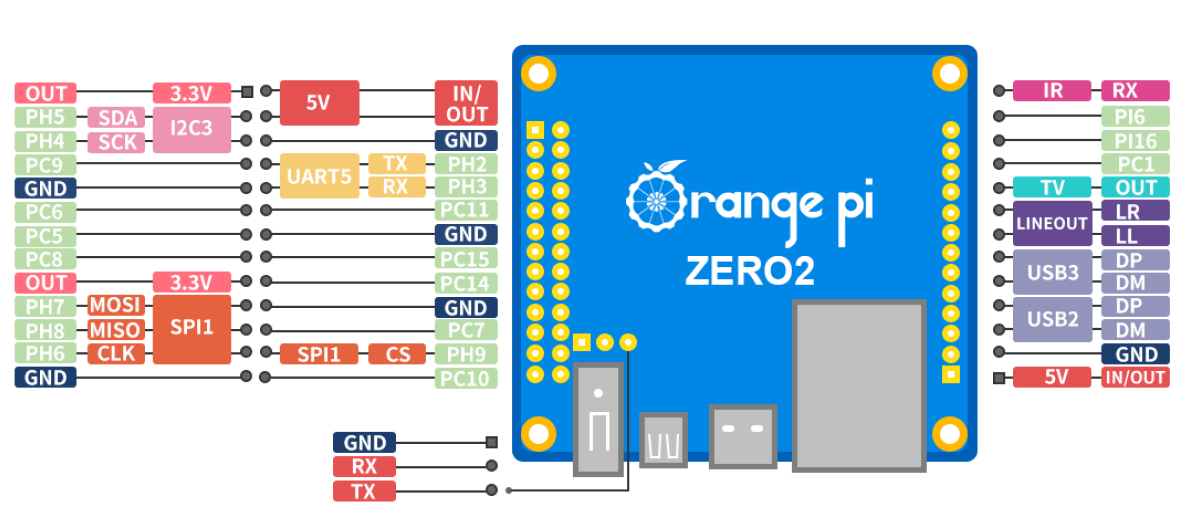
GPIO Chip
When using GPIOs with the Linux MCU in Klipper, you need to identify the correct GPIO chip and line number for each pin. The H616 SoC exposes two GPIO controllers:
| GPIO Chip | Controller | Ports |
|---|---|---|
gpiochip0 |
r_pio | PL |
gpiochip1 |
pio | PA–PI |
Header Pin Mapping
The following table lists all GPIO pins on the 26-pin header with their Klipper pin references:
| Pin Name | GPIO Chip | Line | Klipper Pin |
|---|---|---|---|
| PC5 | gpiochip1 |
69 | host:gpiochip1/gpio69 |
| PC6 | gpiochip1 |
70 | host:gpiochip1/gpio70 |
| PC7 | gpiochip1 |
71 | host:gpiochip1/gpio71 |
| PC8 | gpiochip1 |
72 | host:gpiochip1/gpio72 |
| PC9 | gpiochip1 |
73 | host:gpiochip1/gpio73 |
| PC10 | gpiochip1 |
74 | host:gpiochip1/gpio74 |
| PC11 | gpiochip1 |
75 | host:gpiochip1/gpio75 |
| PC14 | gpiochip1 |
78 | host:gpiochip1/gpio78 |
| PC15 | gpiochip1 |
79 | host:gpiochip1/gpio79 |
| PH2 | gpiochip1 |
226 | host:gpiochip1/gpio226 |
| PH3 | gpiochip1 |
227 | host:gpiochip1/gpio227 |
| PH4 | gpiochip1 |
228 | host:gpiochip1/gpio228 |
| PH5 | gpiochip1 |
229 | host:gpiochip1/gpio229 |
| PH6 | gpiochip1 |
230 | host:gpiochip1/gpio230 |
| PH7 | gpiochip1 |
231 | host:gpiochip1/gpio231 |
| PH8 | gpiochip1 |
232 | host:gpiochip1/gpio232 |
| PH9 | gpiochip1 |
233 | host:gpiochip1/gpio233 |
Pins with Dedicated Functions
Some header pins serve dedicated roles (UART, SPI, I2C). Avoid using them as general-purpose GPIOs if the corresponding overlay is enabled. Refer to the GPIO Pinout diagram for pin functions.
Calculating GPIO Line Numbers
Allwinner SoCs use a simple formula to convert pin names (e.g., PH9) to GPIO line numbers:
Where port base values are: PA=0, PB=32, PC=64, PD=96, PE=128, PF=160, PG=192, PH=224, PI=256, PL=0.
Note
Port PL belongs to gpiochip0 (r_pio) and starts at base 0. All other ports belong to gpiochip1 (pio).
Example: PH9 → port base 224 + pin 9 = 233 → Klipper pin: host:gpiochip1/gpio233
UART
UART5 is enabled by default in MainsailOS via the uart5 device tree overlay. The UART is immediately available
after the first boot.
| Interface | Device Path | Overlay | TX Pin | RX Pin |
|---|---|---|---|---|
| UART5 | /dev/ttyS1 |
uart5 |
PH2 (Pin 8) | PH3 (Pin 10) |
Cross the TX/RX Lines
The TX pin of the SBC connects to the RX pin on the MCU, and vice versa.
Debug UART
The Orange Pi Zero 2 has a dedicated 3-pin debug UART header (GND, RX, TX) on the board. This is intended for serial console access and is not suitable for MCU communication.
SPI
SPI1 is enabled by default in MainsailOS via the spi-spidev and spidev1_1 device tree overlays. It is
pre-configured for use with accelerometers for
Input Shaper.
The SPI device is available at /dev/spidev1.1.
| Function | GPIO Pin |
|---|---|
| MOSI | PH7 |
| MISO | PH8 |
| SCLK | PH6 |
| CS | PH9 |
Example Klipper configuration for an ADXL345 accelerometer:
I2C
I2C3 is enabled by default in MainsailOS via the i2c3-ph device tree overlay. The I2C device is available at
/dev/i2c-1.
| Interface | Overlay | Device Path | SDA Pin | SCL Pin |
|---|---|---|---|---|
| I2C3 | i2c3-ph |
/dev/i2c-1 |
PH5 | PH4 |
In your Klipper configuration, use i2c_bus: i2c.1:
I2C Bus Number
Note that the overlay is called i2c3-ph but the device is exposed as /dev/i2c-1. Use i2c.1 (not i2c.3) in
your Klipper configuration.
Further Resources
- Orange Pi Zero 2 — Official Page
- Armbian Documentation
- Klipper RPi Microcontroller — Klipper Linux MCU guide