Editor Settings
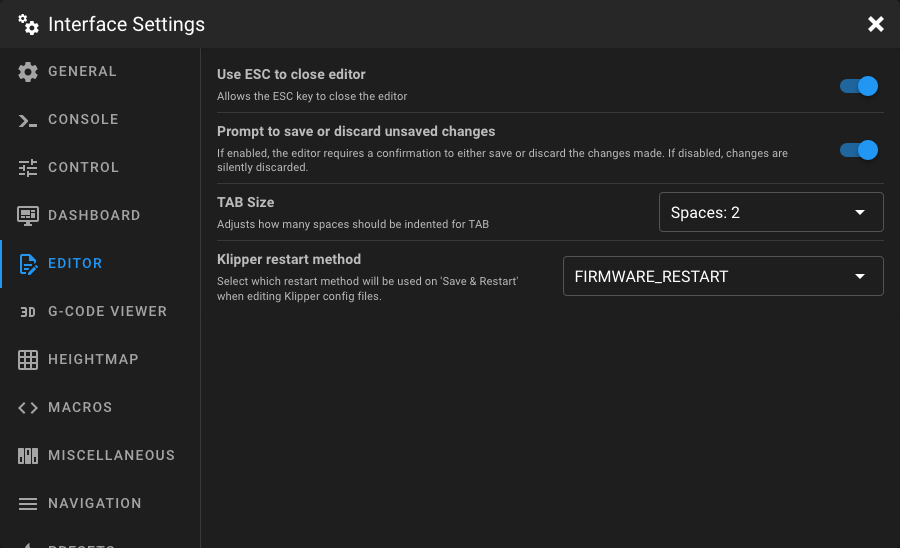
Open the Interface Settings by clicking the cogs icon in the top-right corner, then navigate to Editor.
Use ESC to Close Editor
When enabled, pressing the esc key closes the editor. Disable this option if you prefer to close the editor only via the close button.
Prompt to Save or Discard Unsaved Changes
When enabled, the editor shows a confirmation dialog when closing with unsaved changes, giving you the option to either save or discard your modifications. When disabled, unsaved changes are silently discarded.
TAB Size
Adjusts how many spaces are inserted when pressing the tab key in the editor.
| Option | Description |
|---|---|
| Spaces: 2 (default) | Indents with 2 spaces. |
| Spaces: 4 | Indents with 4 spaces. |
| Spaces: 6 | Indents with 6 spaces. |
| Spaces: 8 | Indents with 8 spaces. |
Klipper Restart Method
Select which restart method is used when clicking Save & Restart after editing a Klipper config file.
| Option | Description |
|---|---|
| FIRMWARE_RESTART (default) | Sends FIRMWARE_RESTART. This also restart all MCUs and load the new MCU firmware configuration. This is the recommended option for most config changes. |
| RESTART | Sends RESTART. This only restart Klippy on the host and will not restart the MCUs. |