G-Code Viewer Settings
Open the Interface Settings by clicking the cogs icon in the top-right corner, then navigate to G-Code Viewer.
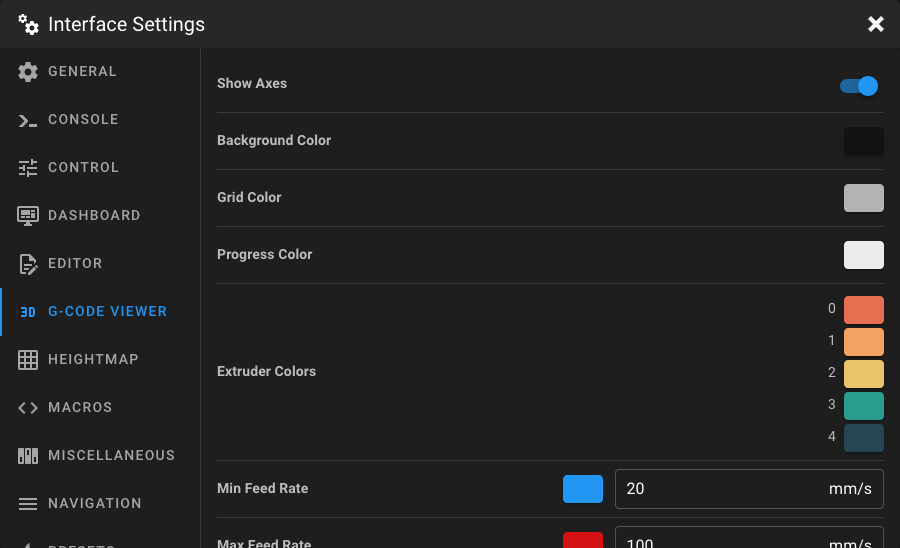
Show Axes
When enabled, the X, Y, and Z axes are displayed in the G-Code Viewer as colored arrows.
Background Color
Set the background color of the G-Code Viewer using the color picker.
Grid Color
Set the color of the build plate grid displayed in the G-Code Viewer.
Progress Color
This color is used to indicate the progress of the print, with the most recently printed filament.
Extruder Colors
Set the color for each extruder's toolpath in the G-Code Viewer. If your Klipper configuration has multiple extruders, a separate color picker is shown for each one.
Min Feed Rate
Configure the color and speed threshold (in mm/s) for the minimum feed rate in the feed rate visualization. Toolpath segments at or below this speed are displayed in the selected color. The value must be greater than 0.
Max Feed Rate
Configure the color and speed threshold (in mm/s) for the maximum feed rate in the feed rate visualization. Toolpath segments at or above this speed are displayed in the selected color. The value must be greater than the min feed rate.
Tip
The Min Feed Rate and Max Feed Rate settings define a color gradient for the feed rate visualization mode. Toolpath segments between the min and max speeds are colored with a gradient between the two selected colors.