mainsail.cfg – Setup & Customization
Mainsail needs a few Klipper configuration sections to work correctly. The easiest way to add them is by including the
ready-made mainsail.cfg file. This page explains what it provides, how to include it, and how to customize its
behavior.
What mainsail.cfg provides
Mainsail requires the following Klipper configuration sections to be present in your printer.cfg. If they are missing,
Mainsail will warn you on the Dashboard with an orange panel like this:
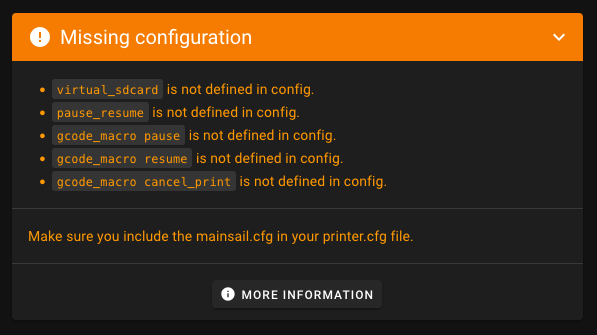
The mainsail.cfg file bundles all of them so you don't have to set them up manually:
[virtual_sdcard]– Enables G-code printing from Mainsail. Without it, the G-Code Files page will not be enabled and Moonraker won't know where to store uploaded G-code files.[display_status]– Provides printer status messages shown in Mainsail's status panel. Necessary if you don't already have a[display]defined.[pause_resume]– Core Klipper support for pausing and resuming jobs.[gcode_macro PAUSE]– Defines how a pause behaves in your setup (parking, retract, etc.).[gcode_macro RESUME]– Defines how to resume a print (restore modes, continue).[gcode_macro CANCEL_PRINT]– Defines how a cancel behaves (turn off heaters, park, clean-up).
Include mainsail.cfg
With this include, all required configuration sections are automatically added to your printer.cfg and you are ready
to print via Mainsail. If you use MainsailOS, this file is already present on your system. To check if it is there, you
can use the Mainsail File Manager to look for mainsail.cfg in your Config Files folder.
To use it, simply add this line to your printer.cfg:
Tip
The default configuration shipped by MainsailOS comes from the mainsail-config repository. You can browse it here: https://github.com/mainsail-crew/mainsail-config
Customize mainsail.cfg
MainsailOS ships mainsail.cfg (client configuration) as a read‑only include. Do not edit mainsail.cfg directly. To
customize its behavior, override the provided variables in your own printer.cfg by adding the special macro
_CLIENT_VARIABLE.
Setting up _CLIENT_VARIABLE:
- Copy the
_CLIENT_VARIABLEmacro frommainsail.cfginto yourprinter.cfg. - Remove the
#comment markers from the first line, the last line (gcode:), and the variables you want to customize. - Adjust the values to fit your printer and preferences, then press
SAVE & RESTARTin the editor.
Note
The last line gcode: is required to define a gcode macro, even if it is empty. This is necessary for Klipper to
parse the configuration correctly.
_CLIENT_VARIABLE reference
The following variables are available in _CLIENT_VARIABLE. You only need to include the variables you want to change,
omitted variables fall back to their defaults.
Park position
| Variable | Default | Description |
|---|---|---|
variable_use_custom_pos |
False |
Enable custom park coordinates. If False, the toolhead parks at the back-right corner (or center for delta printers). |
variable_custom_park_x |
0.0 |
Custom X park position in mm. Only used when variable_use_custom_pos is True. |
variable_custom_park_y |
0.0 |
Custom Y park position in mm. Only used when variable_use_custom_pos is True. |
variable_custom_park_dz |
2.0 |
Z lift in mm when moving to the park position. |
Retract / Unretract / Firmware retraction
| Variable | Default | Description |
|---|---|---|
variable_retract |
1.0 |
Retraction length in mm on PAUSE. |
variable_cancel_retract |
5.0 |
Retraction length in mm on CANCEL_PRINT. |
variable_speed_retract |
35.0 |
Retraction speed in mm/s. |
variable_unretract |
1.0 |
Unretraction length in mm on RESUME. |
variable_speed_unretract |
35.0 |
Unretraction speed in mm/s. |
variable_use_fw_retract |
False |
Use firmware retraction (G10/G11) instead of manual retraction. Requires [firmware_retraction] in printer.cfg. |
Speeds
| Variable | Default | Description |
|---|---|---|
variable_speed_hop |
15.0 |
Z move speed in mm/s when lifting the nozzle. |
variable_speed_move |
100.0 |
XY travel speed in mm/s when moving to the park position. |
Cancel behaviour
| Variable | Default | Description |
|---|---|---|
variable_park_at_cancel |
False |
Move the toolhead to a park position when CANCEL_PRINT is executed. |
variable_park_at_cancel_x |
None |
Custom X position for cancel parking. Uses the regular park position if None. |
variable_park_at_cancel_y |
None |
Custom Y position for cancel parking. Uses the regular park position if None. |
Advanced
| Variable | Default | Description |
|---|---|---|
variable_idle_timeout |
0 |
Override the idle_timeout in seconds while the printer is paused. Set to 0 to leave the existing timeout unchanged. |
variable_runout_sensor |
"" |
Config name of your filament runout sensor (e.g. "filament_switch_sensor runout"). When set, RESUME is blocked if no filament is detected. |
Macro hooks
These variables let you call a single macro command at key points in the PAUSE / RESUME / CANCEL_PRINT flow. Useful for LED status updates or other simple notifications.
| Variable | Default | Runs… |
|---|---|---|
variable_user_pause_macro |
"" |
…after PAUSE_BASE (printer is paused, toolhead not yet parked). |
variable_user_resume_macro |
"" |
…before RESUME_BASE (filament has been unretracted, print is about to continue). |
variable_user_cancel_macro |
"" |
…before CANCEL_PRINT_BASE (heaters are off, job is being cancelled). |
Note
Macro hooks only support a single-line command. If you need multiple steps, create a separate macro and call it by name here.
Examples
Park position
Move the toolhead to the front-left corner on pause and cancel:
[gcode_macro _CLIENT_VARIABLE]
variable_use_custom_pos:  True
variable_custom_park_x:   10.0
variable_custom_park_y:   10.0
variable_custom_park_dz:  5.0
gcode:
Firmware retraction
If your slicer emits G10/G11 commands, and you have [firmware_retraction] configured, you can let Klipper handle
retraction during PAUSE and RESUME instead of using the built-in manual move:
Warning
variable_use_fw_retract: True requires [firmware_retraction] to be defined in your printer.cfg.
Without it, Klipper will throw an error on startup.
Filament runout sensor
If you have a runout sensor, pass its config name so RESUME is automatically blocked when no filament is detected:
[gcode_macro _CLIENT_VARIABLE]
variable_runout_sensor: "filament_switch_sensor runout"
gcode:
The name must match the section name in your printer.cfg exactly. For example, if your config reads
[filament_switch_sensor runout], use "filament_switch_sensor runout".
Macro hooks (LED status)
Call a single macro at each stage of the PAUSE / RESUME / CANCEL flow. A common use case is updating an LED status light:
[gcode_macro _CLIENT_VARIABLE]
variable_user_pause_macro:  "STATUS_PAUSED"
variable_user_resume_macro: "STATUS_PRINTING"
variable_user_cancel_macro: "STATUS_CANCELLED"
gcode:
Reuse the PAUSE macro
You can reuse the PAUSE macro defined in mainsail.cfg in your own custom macros. This allows you to maintain a single
source of truth for how pausing works in your setup while still customizing it for specific use cases. For example, you
can call the PAUSE macro with different parameters to change the parking position or minimum Z height for specific
filament change scenarios.
[gcode_macro M600]
description: Filament change
gcode: PAUSE X=10 Y=10 Z_MIN=50
This calls the PAUSE macro defined in mainsail.cfg but overrides the park position to X=10, Y=10 and sets the
minimum Z height to 50 mm.